Appearance
Broadcom 网卡驱动安装
Broadcom 驱动安装、参数配置及相关故障处理。
返回网卡配置索引 | 上一篇:Mellanox 网卡驱动安装 | 下一篇:中兴定海网卡驱动与配置
博通网卡资料链接:
获取驱动安装包
请联系博通技术支持获取 最新驱动安装包 或者咨询通信库相关同事。
当前已知最新版本: nvmUpgrade_231.4.47.0_MetaX_THOR2_20250919.tar.gz
下载链接(黄区):
安装驱动
提前安装mellanox-ofed 24.07. 并重启。
- 参考本指南的 Mellanox 网卡驱动安装。
安装博通网卡驱动
tar -xv nvmUpgrade_231.4.47.0_Metax_THOR2_20250306.tar.gz  #具体版本根据2.3.3.1获取
cd nvmUpgrade_231.4.47.0_Metax_THOR2_20250306
sudo bash install.sh --with_roce_src
sync # 保证文件写入磁盘
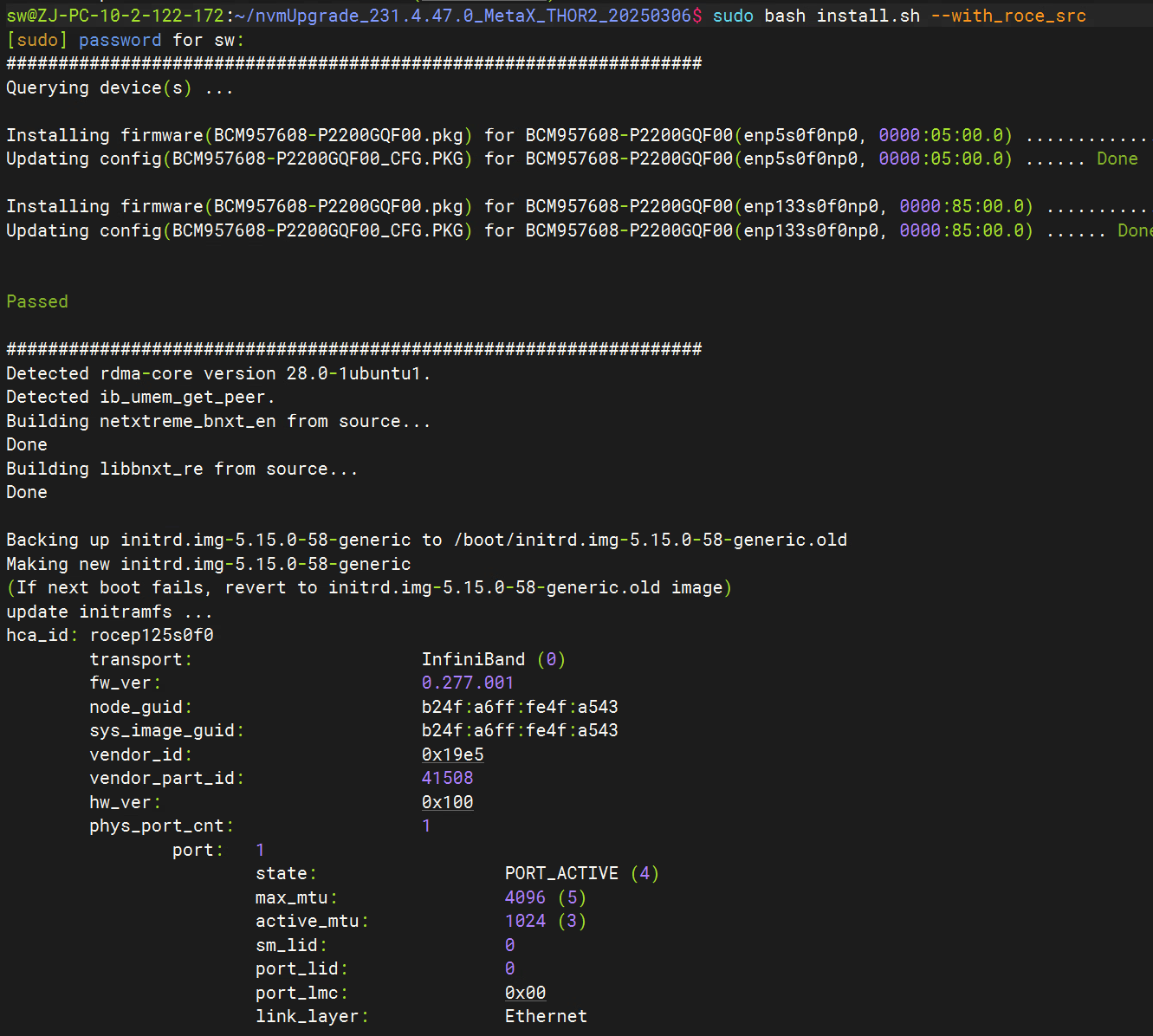
安装完成后日志如下:
修改网卡显示名称
编辑文件: vim /lib/udev/rules.d/60-rdma-persistent-naming.rules
注释掉名称行
#ACTION=="add", SUBSYSTEM=="infiniband", PROGRAM="rdma_rename %k NAME_FALLBACK"执行 ipmitool power cycle 远程重启服务器
服务器启动后执行脚本设置网卡状态(该脚本每次重启后需要执行)
- 设置mrrs,qos,拥塞控制等。
#!/bin/bash
set +x

<< REQUIREMENTS
dscp2prio mapping:
prio:0                               +-|
prio:1                               +-|
prio:2                               +-|
prio:3                               +-|
prio:4                               +-|50%
prio:5 dscp:43(roce)              50%  |
prio:6 dscp:48(cnp)            strict  |
prio:7                               +-|
PFC configuration:
priority:  0 1 2 3 4 5 6 7
enabled    0 0 0 0 0 1 0 0
buffer     0 0 0 0 0 1 0 0
tc: 0 ratelimit: unlimited, tsa: ets, bw: 50%
priority: 0 1 2 3 4 7
tc: 1 ratelimit: unlimited, tsa: ets, bw: 50%
priority: 5
tc: 2 ratelimit: unlimited, tsa: strict
priority: 6
REQUIREMENTS

niccli=""
roce_pkt_pri="5"
roce_pkt_dscp="40"
cnp_pkt_pri="6"
cnp_pkt_dscp="48"
pri2tsa="0:ets,1:ets,2:strict,3:strict,4:strict,5:strict,6:strict,7:strict"
pri2tc="0:0,1:0,2:0,3:0,4:0,5:1,6:2,7:0"
tc2bw="50,50,0"

cc_mode="3"  # 1:PFC only, 2:CC only, 3:PFC+CC
cc_algorithm="1" # 0:DCTCP/DCQCN-D, 1:DCQCN-P
thor2_perf="1"   # 0:default cfg,   1:performance cfg

del_qos()
{
app_array=()
app_num=0
for value in $($niccli -pci $1 get_qos 2> /dev/null | grep -A 2 "Priority" | grep -oE "[0-9]+"); do
app_array[$app_num]=$value
app_num=$(($app_num+1))
done
echo "" > /tmp/del_qos.txt
for (( app=0; app<$app_num; app+=3 )); do
apptlv=${app_array[$(($app+0))]},${app_array[$(($app+1))]},${app_array[$(($app+2))]}
echo "set_apptlv -d app=$apptlv" | tee -a /tmp/del_qos.txt
done
echo "set_pfc enabled=none" | tee -a /tmp/del_qos.txt
$niccli -pci $1 --batch /tmp/del_qos.txt 1> /dev/null 2>&1
}

add_qos()
{
echo "set_ets tsa=$pri2tsa priority2tc=$pri2tc tcbw=$tc2bw" | tee /tmp/add_qos.txt
if [[ $cc_mode == "1" || $cc_mode == "3" ]]; then
echo "set_pfc enabled=$roce_pkt_pri" | tee -a /tmp/add_qos.txt
fi
echo "set_apptlv app=$roce_pkt_pri,3,4791" | tee -a /tmp/add_qos.txt
echo "set_apptlv app=$roce_pkt_pri,5,$roce_pkt_dscp" | tee -a /tmp/add_qos.txt
echo "set_apptlv app=$cnp_pkt_pri,5,$cnp_pkt_dscp" | tee -a /tmp/add_qos.txt
$niccli -pci $1 --batch /tmp/add_qos.txt 1> /dev/null 2>&1
$niccli -pci $1 get_qos 2> /dev/null
}

set_cc()
{
mkdir -p /sys/kernel/config/rdma_cm/$1
echo "RoCE v2" > /sys/kernel/config/rdma_cm/$1/ports/1/default_roce_mode
mkdir -p /sys/kernel/config/bnxt_re/$1
cc_path="/sys/kernel/config/bnxt_re/$1/ports/1/cc"
echo -n 0x1 > $cc_path/disable_prio_vlan_tx
if [[ $cc_mode == "1" ]]; then
echo -n 0x0 > $cc_path/ecn_marking
echo -n 0x0 > $cc_path/ecn_enable
else
echo -n 0x1 > $cc_path/ecn_marking
echo -n 0x1 > $cc_path/ecn_enable
fi
echo -n 0x1   > $cc_path/advanced
echo -n 0x1   > $cc_path/apply
if [[ $cc_algorithm == "0" ]]; then
# DCTCP, DCQCN-D
echo -n 0x0   > $cc_path/cc_mode
echo -n 0x1   > $cc_path/cp_bias_en
echo -n 0x0   > $cc_path/tr_update_mode
echo -n 0x1   > $cc_path/exp_crcp_ratio
echo -n 0x280 > $cc_path/max_cp_cr_th
echo -n 0x15e > $cc_path/reduce_cf_rtt_th
else
# DCQCN-P
echo -n 0x1   > $cc_path/cc_mode
echo -n 0x0   > $cc_path/cp_bias_en
echo -n 0x1   > $cc_path/tr_update_mode
echo -n 0x7   > $cc_path/exp_crcp_ratio
echo -n 0x3ff > $cc_path/max_cp_cr_th
echo -n 0x3eb > $cc_path/reduce_cf_rtt_th
fi
if [[ $thor2_perf == "1" ]]; then
echo -n 0x5    > $cc_path/rtt
echo -n 0x3f   > $cc_path/cnp_ratio_th
echo -n 0x2    > $cc_path/fr_num_rtts
echo -n 0x3    > $cc_path/tr_update_cyls
#echo -n 0x1    > $cc_path/tr_update_mode
echo -n 0x3    > $cc_path/red_div
echo -n 0x8    > $cc_path/g
echo -n 0xc8   > $cc_path/init_cr
echo -n 0x3f0  > $cc_path/init_tr
echo -n 0x100  > $cc_path/init_cp
echo -n 0x4    > $cc_path/red_rel_rtts_th
echo -n 0x180  > $cc_path/sc_cr_th1
echo -n 0x240  > $cc_path/sc_cr_th2
echo -n 0x17f0 > $cc_path/tr_lb
fi
echo -n 0x1 > $cc_path/apply
sleep 0.5
cat $cc_path/apply
}

set_mrrs()
{
mrrs="0x1"
word=$(setpci -s $1 CAP_EXP+8.w)
word=$(printf "%x" $((((0x${word} & 0x8fff) | ($mrrs << 12)))))
setpci -s $1 CAP_EXP+8.w=$word
}

main()
{
work_path=$(cd `dirname $0`; pwd)
niccli=$(find ./ -type f \( -name "niccli" -o -name "niccli.x86_64" \)  \
-size +512k 2>/dev/null | head -1)

if [[ $niccli == "" ]]; then
niccli=$(which niccli niccli.x86_64 | head -1)
if [[ $niccli == "" ]]; then
echo "Cannot find niccli tool."
exit 0
fi
fi
niccli='/usr/local/bin/niccli'
chmod +x $niccli
systemctl stop lldpad.service &> /dev/null

if [[ $1 == "" ]]; then
devlist=$(lspci -Dn | grep 14e4:1760 | awk '{print $1}')
else
devlist=$1
fi

for pcidev in $devlist; do
netdev=$(ls /sys/bus/pci/devices/$pcidev/net 2> /dev/null)
if [[ $netdev == "" ]]; then
continue
fi
ethtool -A $netdev rx off tx off &> /dev/null
set_mrrs $pcidev
del_qos $pcidev
add_qos $pcidev
if [[ ! -d /sys/bus/pci/devices/$pcidev/infiniband ]]; then
continue
fi
ibdev=$(ls /sys/bus/pci/devices/$pcidev/infiniband)
if [[ ! -d /sys/kernel/config/bnxt_re/$ibdev ]]; then
mkdir -p /sys/kernel/config/bnxt_re/$ibdev
fi
set_cc $ibdev
done
}

main $@
检验安装结果

FAQ
博通网卡运行mccl all_reduce_perf 数据校验出错
问题原因:
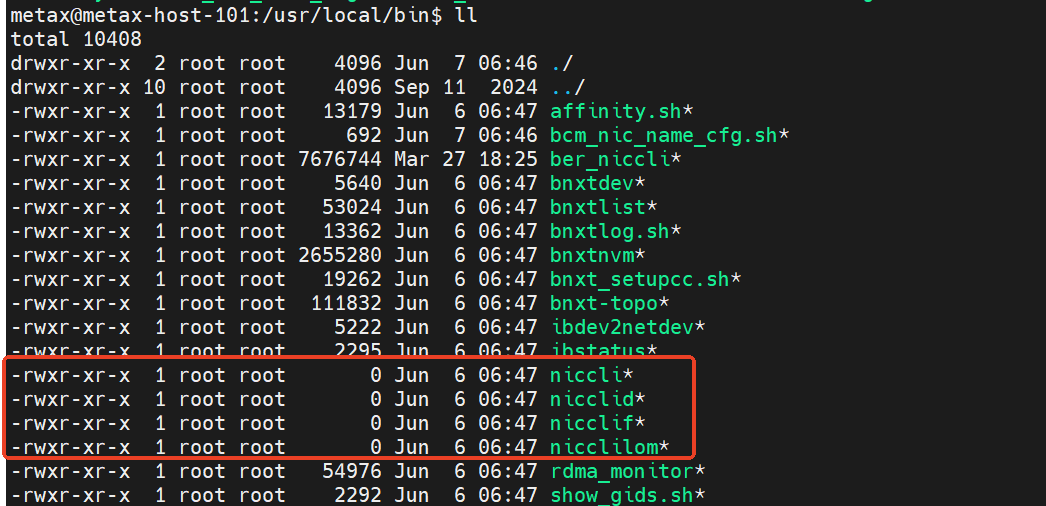
客户安装完博通驱动文件,立即调用ipmi-tool power cycle 重启机器,导致博通驱动配置文件没用写入到磁盘,导致博通驱动 文件损坏,导致博通网卡配置MRRS服务没有启动,MRRS没有设置正确,从而导致数据传输出错。
问题解决
重新安装博通驱动文件修复问题。
中兴定海网卡运行mccl all_reduce_perf 数据校验出错
问题原因:
中兴定海网卡MRRS没有设置正确,从而导致数据传输出错。 当前需要脚本手动设置。
#!/bin/bash
set +x

target_mrrs="1"

main()
{
if [[ $1 == "" ]]; then
devlist=$(lspci -Dn | grep "1cf2:" | awk '{print $1}')
else
devlist=$1
fi

mrrs=${target_mrrs}
for pcidev in $devlist; do
word=$(setpci -s $pcidev CAP_EXP+8.w)
word=$(printf "%x" $((((0x${word} & 0x8fff) | ($mrrs << 12)))))
setpci -s $pcidev CAP_EXP+8.w=$word
echo "setpci -s $pcidev CAP_EXP+8.w=$word"
done
}

main "$@"