Appearance
锐捷 RoCE 交换机配置
锐捷 RoCE 交换机常用操作、VLAN、端口拆分和 400 Gbit/s 推荐配置。
返回交换机配置索引 | 上一篇:H3C RoCE 交换机配置 | 下一篇:华为 RoCE 交换机配置
常用的基本操作
进入特权模式
config
端口连接状态
show interface brief
查看当前配置
show running-config
端口拆分和恢复
400G 拆分成 200G
bash
config

split interface FH0/1
400G 拆分成 200G后恢复400G
bash
no split interface FH0/1使能端口
bash
no shutdown丢包查看
bash
show interfaces FH0/1 counters drops查看ecn相关
查看队列是否使能ecn
bash
show qos ecn int FH0/2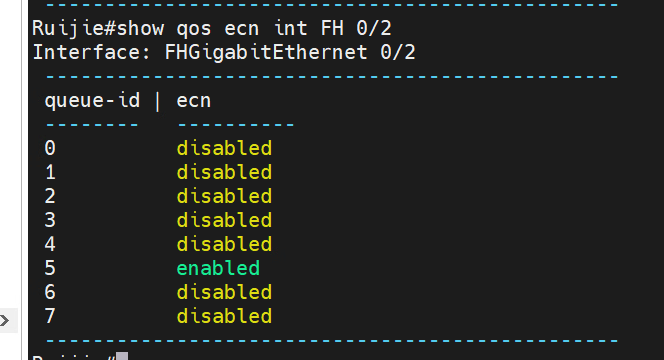
查看ecn计数
bash
show qos wred-ecn statistics int FH0/2
添加vlan
bash
interface FH0/1

interface range FH0/1-10

switchport access vlan 10
400Gbps交换机的推荐配置
假设使用优先级 5 来承载分布式存储的 RoCEv2 流量。在交换机里,各个面板端 口需要针对优先级 5 使能 PFC 流控,命令行如下。
bash
mtu forwarding 9000

ip-ref-load-balance-profile default

ipv4 field protocol src-ip dst-ip l4-src-port l4-dst-port

!

priority-flow-control counting-interval 1

priority-flow-control deadlock counting-interval 1

priority-flow-control deadlock cos-value 5 detect 10 recover 100

qos-queue compatible enable

mls qos scheduler drr

!

mls qos map dscp-cos 40 to 5

mls qos map dscp-cos 48 to 6

drr-queue bandwidth 1 1 1 1 1 95 0 0

qos wred-ecn statistics sample-period 1

queueing wred

!

mmu sample-period buffer-counter 1

mmu sample-period queue-counter 1

mmu pg-headroom set 30720

mmu usage-warn-limit set 90

# 接口配置:

interface FH0/9  //批量配置可使用interface range FH0/9-19

carrier-delay up 2 down 0

priority-flow-control nodrop 5 on

priority-flow-control early-warning 5 input pps 15000

priority-flow-control early-warning 5 output pps 15000

priority-flow-control deadlock cos-value 5 enable

qos queue 5 ecn

qos queue 5 bandwidth maximum 400000000 // 表示400G, 需要根据情况修改

wrr-queue random-detect min-threshold cell 5 5000 5000

wrr-queue random-detect max-threshold cell 5 30000 30000

wrr-queue random-detect probability 5 20 20

mls qos trust dscp

nak counting enable

cnp counting enable

mmu usage-warn-limit unicast 5 set 80

mmu usage-warn-limit pg-headroom 5 set 80

mmu xoff-threshold pg 5 set 50

mmu headroom-threshold pg 5 set 1200

mmu xon-threshold-offset pg 5 set 50

mmu pg-guarantee pg 5 set 17

# 保存配置

end

write